Chats
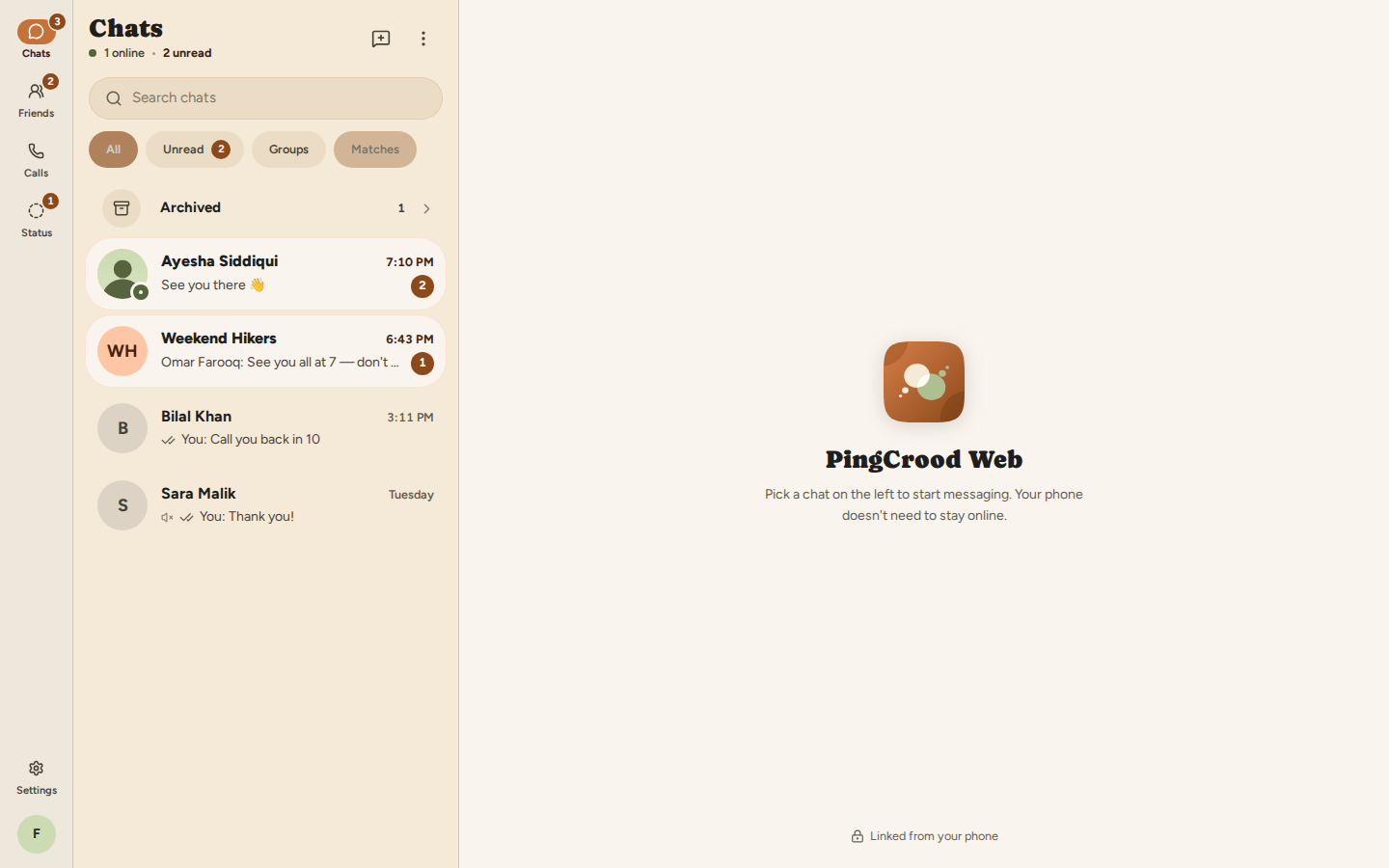
Text, photos, files and voice notes — instant, with replies, reactions, edits and a search that jumps you straight back to the moment.
Meet someone new
PingCrood is a messenger made for real conversation — chats and groups, voice and video calls, 24-hour stories — with Random Match for the days you feel like meeting someone new.
Everything in one app
PingCrood puts Chats, Friends, Calls, Status and You in five tabs — the whole of your social life, without switching apps.
Text, photos, files and voice notes — instant, with replies, reactions, edits and a search that jumps you straight back to the moment.
Make one in seconds, give it a photo, share an invite link and mention people. Everyone you add sees it appear straight away.
Call one friend or the whole group. Calls ring even when the app is closed, and shrink to a floating window while you do other things.
Text or photo stories that last 24 hours, with seen rings so you know who's caught up — and your privacy setting deciding who sees them.
Find people by username or a QR code, send a request, and see the friends you already have in common before you say yes.
For the days you feel like meeting someone new: one tap, a short video chat, and a friend request if it clicks.
Chats & groups
In PingCrood every message lands instantly and shows you when it's delivered and seen. Reply to the exact line, react with an emoji, or record a voice note when typing won't do.
Voice & video calls
Start a PingCrood voice or video call from a chat, a profile or your history. Bring the whole group in, or make a call link and send it anywhere — friends join with a tap.
Status
A photo from the trail, a line about your morning. Friends see it for 24 hours, then it's gone. Seen rings show who's caught up; a tap opens the full-screen viewer with progress dots.
Friends
Search a username, scan a friend's QR code, or add someone straight from a match. Requests show the friends you already share, so saying yes is easy.
Random Match
One tap on the Chats tab starts a short video chat with someone you've never met. You see who they are before you decide to stay — and if it clicks, a friend request turns it into a real conversation.
PingCrood Web
PingCrood Web puts your chats in the browser. Open You → Linked devices in the app, scan the QR code, and you're in — your phone doesn't need to stay online. Open PingCrood Web.
Light & dark
Follow your phone, or pin light or dark. Every screen is drawn for both.
Your space, your rules
On PingCrood you decide what people see and who gets to reach you. The controls are simple, and they're always one tap away — so you can relax and just talk.
Last seen, photo, about and status — each set to Everyone, My contacts or Nobody. Read receipts can be off.
Someone you block can't find, message or call you, add you to groups — or be matched with you. Reporting takes one tap.
Turn on two-step verification with any authenticator app, and keep printable recovery codes for a rainy day.
See where you're signed in — phone, browser, laptop — and sign any of them out from your phone, instantly.
Questions
Yes. PingCrood is free to download and free to use on Android. There are no ads, no coins and nothing to buy. PingCrood Web is free too.
PingCrood is for people aged 18 and over. Random Match uses the birthday on your profile, and only your age is ever shown to the other person.
Press Start and PingCrood pairs you with someone else who is waiting, for a live video chat. You can set filters — gender, age range and country — and a badge shows when a match meets all of them. Your camera stays off until you press Start, you can press Next person at any time (nobody is told why), and a Safety button to report or block is always one tap away.
Yes. Open PingCrood Web, then in the app go to You → Linked devices and scan the QR code. Your chats open in the browser, and your phone does not need to stay online. You can sign a device out from your phone at any time.
A person you block cannot find you, message you, call you or add you to groups — and is never matched with you in Random Match. You can unblock them later from Blocked contacts.
Call audio and video are encrypted in transit. You can also turn on two-step verification with any authenticator app, choose who sees your last seen, photo, about and status, and see every device signed in to your account.
PingCrood is on Android today, and an iPhone version is on the way. In the meantime PingCrood Web works in any modern browser once you have linked it from an Android phone.
Free on Android, with PingCrood Web for your computer. Your chats, calls and stories in one warm place — and someone new whenever you feel like it.